

The Employee Offboarding Checklist — Protecting Company Data When Someone Leaves
Employee offboarding is one of the most common — and most overlooked — sources of business data loss and security exposure. A practical checklist covering the backup and access-revocation steps most companies skip, plus a full 10-point checklist you can use today.
Offboarding is a data protection event, not just an HR one.
Most checklists cover access revocation well. The step that gets skipped most often — backing up the device before it’s wiped — is exactly where real data loss happens.
Employee offboarding tends to be treated as purely an HR and IT-access process — disable email, remove from Slack, revoke SSO. Those steps matter, and most companies handle them reasonably well. What gets missed far more often is the data protection side: actually backing up and auditing what was on a departing employee’s device before it gets wiped and reissued to someone new.
We’ve helped over 500 businesses think through backup strategy, including offboarding-specific gaps, and this pattern is remarkably consistent: the access revocation checklist exists, but the data protection checklist often doesn’t.
Why offboarding is a data protection event
The moment a device is wiped, anything that wasn’t backed up first is permanently gone. Unlike most data-loss scenarios, this one is entirely predictable and entirely avoidable — there’s no ransomware, no accident, just a process that skipped a step. That predictability is exactly why it deserves a formal checklist rather than being handled ad-hoc each time.
The access-revocation checklist
Most organizations handle this reasonably well, but it’s worth confirming every access point is actually covered.
What to back up before the wipe
Backup must happen BEFORE access revocation, not after
If you revoke a departing employee’s Softyz or backup service access before confirming their final device backup completed, you risk losing anything that hadn’t already been captured. Always sequence this: confirm the final backup completed, THEN revoke access.
Handling personal vs. company data on BYOD devices
When the departing employee’s device is their own (BYOD), backing up “everything” isn’t appropriate — it would sweep in personal data that isn’t the company’s to retain. This is best addressed with a clear BYOD policy established well before any specific departure, defining what counts as company data (e.g., anything in a specific work folder or company-managed app) versus personal data that should be excluded entirely from any backup or audit.
Shared folder and permission audits post-departure
After removing a departing employee’s access, audit any shared folders they had elevated permissions on. It’s common for a former employee’s access to linger on shared resources even after their primary accounts are disabled — particularly folders they created or were granted direct (rather than group-based) access to.
Documenting the offboarding for compliance purposes
Keep a simple record of what was done and when: access revoked, final backup confirmed, shared folder audit completed. This documentation matters more than most companies expect — auditors and, in disputed departure situations, legal counsel may ask for exactly this record.
Setting up Softyz Teams role removal correctly
-
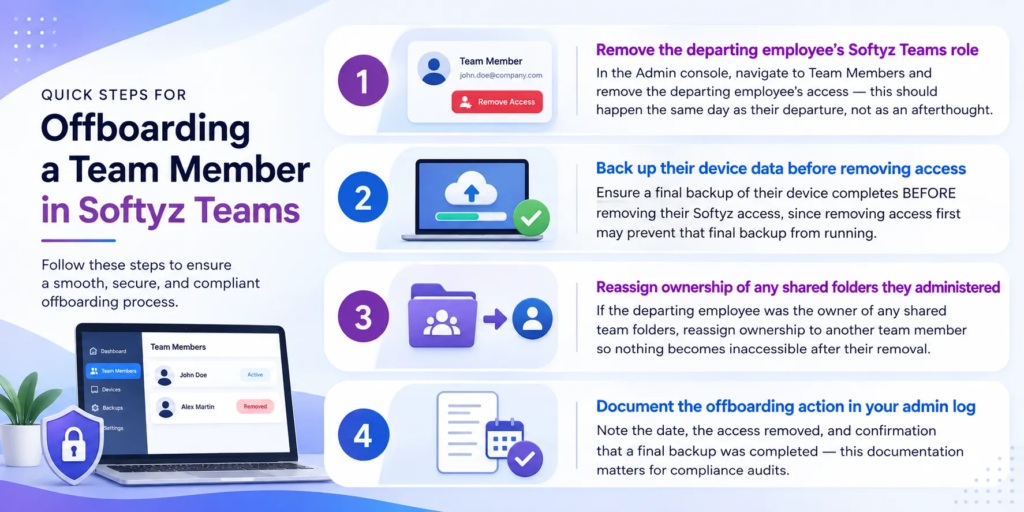
- Remove the departing employee’s Softyz Teams role: In the Admin console, navigate to Team Members and remove the departing employee’s access — this should happen the same day as their departure, not as an afterthought.
- Back up their device data before removing access: Ensure a final backup of their device completes BEFORE removing their Softyz access, since removing access first may prevent that final backup from running.
- Reassign ownership of any shared folders they administered: If the departing employee was the owner of any shared team folders, reassign ownership to another team member so nothing becomes inaccessible after their removal.
- Document the offboarding action in your admin log: Note the date, the access removed, and confirmation that a final backup was completed — this documentation matters for compliance audits.
The complete 10-step checklist
Full offboarding data protection checklist
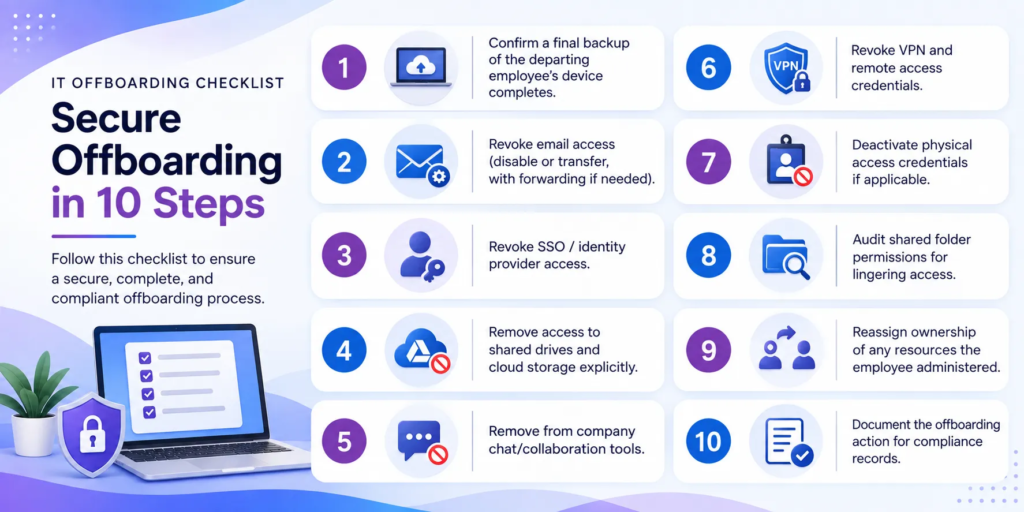
1. Confirm a final backup of the departing employee’s device completes.
2. Revoke email access (disable or transfer, with forwarding if needed).
3. Revoke SSO / identity provider access.
4. Remove access to shared drives and cloud storage explicitly.
5. Remove from company chat/collaboration tools.
6. Revoke VPN and remote access credentials.
7. Deactivate physical access credentials if applicable.
8. Audit shared folder permissions for lingering access.
9. Reassign ownership of any resources the employee administered.
10. Document the offboarding action for compliance records.
Frequently asked questions
Q: Should we back up a departing employee’s device even if they were let go for cause?
Yes — the data protection need doesn’t change based on the reason for departure. If anything, documented backups become more important in situations involving disputes, since they preserve a record of exactly what existed at the time of departure.
Q: What’s the right order: revoke access first, or back up first?
Back up first, then revoke access. Revoking access before confirming a final backup completed risks losing anything that wasn’t already captured, especially if the device needs to be wiped and reissued quickly.
Q: How do we handle BYOD devices where personal and company data are mixed?
Ideally, this should be addressed by policy before it becomes an offboarding question — a clear BYOD agreement specifying what company data lives where. Without that, offboarding a BYOD device requires careful, case-by-case handling to separate company data without overreaching into personal data.
Q: How long should we keep a departed employee’s backed-up data?
This should align with your organization’s documented data retention policy, and may also be influenced by industry-specific requirements. There isn’t a universal right answer, but it should be a deliberate policy decision, not an afterthought handled differently each time someone leaves.
None of these ten steps are individually complicated — the value is in having them as a formal, repeatable checklist rather than relying on whoever happens to be handling a specific departure to remember everything under time pressure.
Rohan Kapoor
Co-founder & CPO at Softyz Inc. Rohan has personally helped over 500 businesses design their backup strategy, including formalizing offboarding processes that consistently get overlooked until a real gap surfaces.