

Ubuntu · CentOS & more
The Remote Backup Service Linux Servers and Workstations Actually Deserve
Softyz Inc. is a remote backup service designed specifically for Linux—a lightweight, headless agent deployed via CLI, configured through a simple YAML file, and capable of protecting everything from a development workstation to a fleet of production servers. Whether you need server cloud backup for a single machine or an online cloud backup solution that scales across your entire infrastructure, Softyz fits into your existing workflow without adding complexity.
Core features
Powerful backup without a GUI in sight
Softyz for Linux is built the way Linux users expect — lean, scriptable, configurable, and completely at home in a terminal or a cron job.
Define everything in a simple YAML config — paths, schedules, exclusions, retention policies, and encryption keys. Version control your backup config just like your code.
Only changed blocks are uploaded — not whole files. This keeps bandwidth usage minimal and backup windows short, even for large directories.
Run as a systemd service for always-on protection, or trigger backups with cron for fine-grained scheduling. Works exactly how you’d expect on Linux.
Files are encrypted client-side using 256/192/128-bit AES before transmission. Your private key never leaves your machine — not even Softyz Inc. can access your data.
Quick install
Up and running in one command
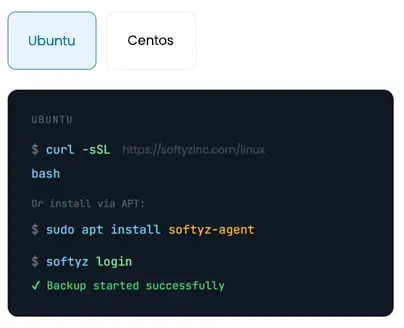
Choose your distro and paste a single install command. The Softyz agent installs, registers as a systemd service, and is ready to configure in under 60 seconds.
Setup guide
From install to first backup
Install the agent
Run the one-liner install script or install via your distro's package manager. The agent auto-registers as a systemd service.
Authenticate your account
Log in with your Softyz credentials or API token — ideal for automated server deployments and CI/CD pipelines.
Define your backup paths
Edit the YAML config or pass paths directly via CLI. Set schedules, exclusions, and retention all in one place.
Enable the systemd service
Enable the daemon for always-on protection. The agent runs in the background, picks up file changes, and backs them as per schedules.
Use cases
Who uses Softyz on Linux?
From solo users to DevOps teams managing dozens of servers — Softyz fits seamlessly into every Linux workflow.
Pair Softyz Inc. with pg_dump, mysqldump, or mongodump in a cron script to automatically back up database exports to the cloud after every scheduled dump.
Integrate Softyz Inc. into your deployment pipelines via API token auth. Trigger pre-deploy backups automatically and roll back instantly if something goes wrong.
Deploy the headless agent on web servers, database hosts, and VMs. Automatically back up /etc, /var/www, database dumps, and application data — on a cron or continuously.
Back up your entire home directory, dotfiles, git repos, and project folders. If your workstation dies, spin up a new one and restore everything in minutes.
What Linux users say
Linux — Reviews from US users
The CLI is genuinely great. Clean command structure, good exit codes, pipeline-friendly output. I have Softyz Inc integrated into our CI/CD pipeline — pre-deploy backup, post-deploy verify. If a deploy goes south, we’re back to a clean state in minutes. Exactly what DevOps backup tooling should be.”
Used rsync-to-S3 scripts for 6 years. They worked, but maintaining them was a part-time job. Replaced everything with Softyz Inc and one Ansible playbook. My entire 18-server fleet runs it now. I got 6 hours a week of my life back.”
Support knew exactly what ‘systemd unit file’, ‘cron expression’, and ‘delta sync’ meant without me having to explain. They spoke Linux fluently. That is rare. Most SaaS support desks have never seen a terminal window. Softyz Inc clearly hired people who use Linux themselves.