

“How long will a restore take?” is one of the most common pre-purchase questions we get — and the honest answer depends on more than just internet speed. A real timed test, the variables that actually matter, and what to expect at your own connection speed.
Restore time is not just a bandwidth question.
Connection speed matters, but so does whether you’re restoring to a new device, and whether it’s a partial or full restore.
“How long would a restore actually take?” is one of the most common questions we hear from people evaluating cloud backup — understandably, since it’s directly tied to how bad a worst-case scenario would actually be. Most answers to this question online are vague, so we ran a real timed test instead of guessing.
The variables that actually matter
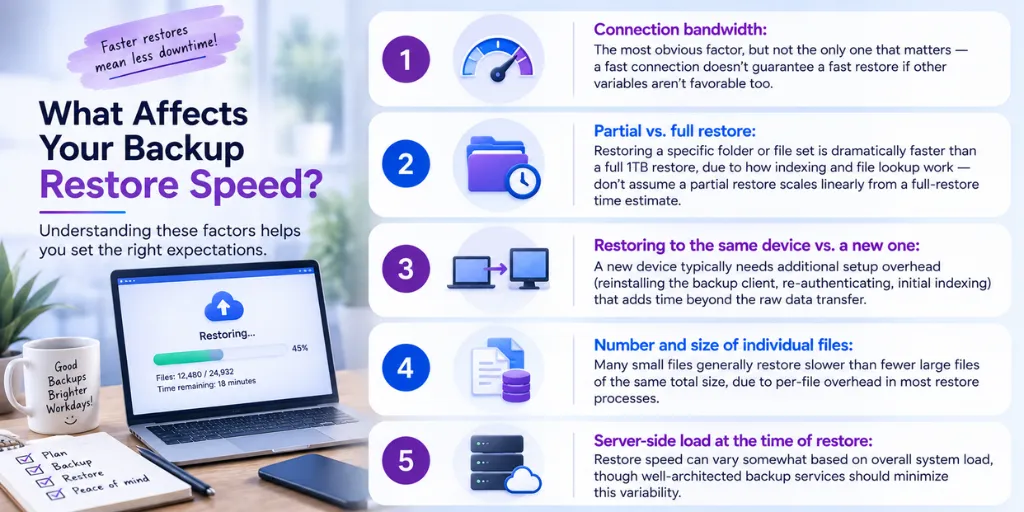
- Connection bandwidth: The most obvious factor, but not the only one that matters — a fast connection doesn’t guarantee a fast restore if other variables aren’t favorable too.
- Partial vs. full restore: Restoring a specific folder or file set is dramatically faster than a full 1TB restore, due to how indexing and file lookup work — don’t assume a partial restore scales linearly from a full-restore time estimate.
- Restoring to the same device vs. a new one: A new device typically needs additional setup overhead (reinstalling the backup client, re-authenticating, initial indexing) that adds time beyond the raw data transfer.
- Number and size of individual files: Many small files generally restore slower than fewer large files of the same total size, due to per-file overhead in most restore processes.
- Server-side load at the time of restore: Restore speed can vary somewhat based on overall system load, though well-architected backup services should minimize this variability.
Real timed test results: 1TB restore
We ran a real timed test restoring a 1TB dataset at different connection speeds, comparing restoring in-place versus to a new device.
These are real-world estimates, not theoretical maximums
Actual results assume a stable, dedicated connection. Background network usage, other devices competing for bandwidth, and ISP throttling can meaningfully extend these numbers — treat them as a reasonable planning baseline, with some buffer for real-world conditions.
Partial restore vs. full restore
If you only need a specific folder or file set back — not your entire 1TB backup — the restore is dramatically faster than the full-restore numbers above would suggest, due to how indexing and lookup work for a smaller target. Most real-world restore situations are actually partial restores (a specific accidentally-deleted folder, a single corrupted file) rather than a full catastrophic restore, so it’s worth understanding both scenarios rather than only planning around the worst case.
What to expect on a slower connection
If your connection is meaningfully slower than the tiers tested above, the relationship is roughly linear for the data-transfer portion of a restore — half the bandwidth roughly doubles the transfer time — though the fixed overhead (setup, indexing) stays relatively constant regardless of connection speed, so very slow connections see a smaller relative penalty than you might expect for that portion specifically.
Frequently asked questions
Q: Why would restoring to a new device take longer than restoring to the same device?
A new device restore typically includes additional steps beyond raw data transfer — installing and authenticating the backup client, initial system indexing, and sometimes reconstructing folder structures from scratch, all of which add time beyond just moving the data.
Q: If I only need a few files back, should I expect it to take a fraction of the full restore time?
Often even less than a simple fraction would suggest — partial restores benefit from not needing to process the full index of your entire backup, so a small partial restore is typically much faster proportionally than the math would imply.
Q: Does restore speed differ from backup (upload) speed?
They’re related but not identical — both are constrained by your connection bandwidth, but restore (download) speeds are often faster than upload speeds on typical consumer internet connections, which are frequently asymmetric (faster download than upload).
Q: What should I actually do with this information?
Use it to set realistic expectations before an emergency, not during one. If your calculated restore time for your actual data volume feels too slow for your situation, that’s useful information for planning — either accepting the tradeoff, upgrading your connection, or reconsidering how much data truly needs to be in the “restore this urgently” category versus longer-term archival.
Conclusion
Knowing your realistic restore time in advance — for your actual data volume and connection — turns “I have no idea how bad this would be” into an informed, planned-for number, which is a meaningfully better position to be in before you ever actually need a restore.
Priya Sundaram
Co-founder & CTO at Softyz Inc. Priya has spent 12 years building cloud security and backup infrastructure, and led the real-world timed testing behind the restore-speed numbers in this article.