
Ransomware is no longer something only highly skilled criminal groups can deploy. With ransomware-as-a-service (RaaS), developers maintain the malicious tooling while affiliates rent or license it to attack targets. That lowers the technical barrier, expands the pool of potential attackers, and makes tested, isolated backups more important than ever.
For a long time, the mental picture of ransomware was a skilled group building something sophisticated and aiming it at a chosen victim. That picture is out of date. A growing share of ransomware now runs on a service model: developers build and maintain the tool, and other people pay to use it. The people carrying out the attack may have little technical depth of their own.
What Is Ransomware-as-a-Service (RaaS)?
Ransomware-as-a-service (RaaS) is a criminal business model in which one group develops and maintains ransomware tooling, while other actors pay a fee or share proceeds to use it against targets. The affiliate may handle targeting, deployment, and extortion without building the malware itself.
- Developers build and maintain the tool
A core group focuses on the software and the infrastructure around it, and keeps improving it over time.
- Affiliates license access
Other criminals pay a fee or share of proceeds to use the tool, without needing to build it themselves.
- Affiliates choose the targets
The people running the attack decide who to go after, so the target list reflects many different people’s opportunism.
- Proceeds are split
Developers and affiliates divide any payment, which gives both sides a continuing incentive to improve and expand.
How RaaS Changes Your Ransomware Risk
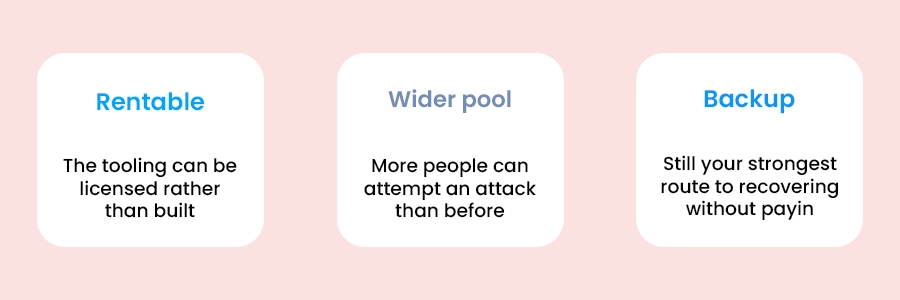
The important shift is not that every attacker becomes highly sophisticated. It is that the specialized work is increasingly available for rent, making opportunistic attacks more feasible for a wider range of actors.
“We’re too small to be a target” is a weaker defense than it used to be
When many people can rent the same tooling, someone can try a large number of targets cheaply. That makes exposure and preparation matter more than company size. It does not mean every business will be hit. It means the odds are less comfortable than the old assumption suggested.
How to Plan Backups for Ransomware Recovery
Ransomware recovery comes down to a few practical questions. Can the attacker reach your backup? Does your history reach back far enough? Do you know how much recent data you could lose? Have you ever actually restored anything? The rental model doesn’t change these questions, but it raises the cost of getting them wrong.
Know your recovery point Objective(RPO)
Your recovery point is the time of your last completed backup. Your recovery point objective (RPO) is the maximum amount of recent data you can afford to lose. If Softyz completes a backup at 6:00 p.m. and an incident occurs at 9:00 a.m. the next day, everything changed after 6:00 p.m. is at risk unless another recovery path exists. Choose a schedule that matches how much recent work you could afford to redo, and see our post on matching your schedule to your change rate for more.
Ransomware Backup Readiness Checklist
A backup is only ransomware-resilient if an attacker cannot easily reach, alter, or delete it. Keep backup credentials separate from everyday administrator accounts, use encryption and access controls, retain enough version history to recover from a delayed discovery, and validate that a restore actually works. CISA advises maintaining offline, encrypted backups and testing their availability and integrity regularly.
Make the checklist more actionable and scannable:
- Protect backup access separately. Use a unique password and MFA for backup accounts; do not reuse production administrator credentials.
- Retain enough restore history. Confirm that version history reaches far enough behind a slow-moving infection; Softyz retains 90 days.
- Define and monitor your RPO. Match backup frequency to the amount of recent work your business can tolerate losing.
- Run a real restore test quarterly. Restore a representative file or folder, verify its integrity, and record the date and result.
- Assign first-hour incident roles. Document who isolates systems, who contacts leadership and counsel, who preserves evidence, and who begins recovery.
Frequently asked questions
Q: Does ransomware-as-a-service mean attacks are getting more common?
It tends to mean more people are able to carry attacks out, which widens the pool of attackers. We’d treat that as a reason to plan for it rather than as a precise forecast of how often any one organization will be hit.
Q: Are small businesses really at risk, or is this mostly an enterprise problem?
Small businesses are exposed too. When the tooling is rented, an attacker can try many targets cheaply, so being small is a weaker protection than it used to feel. Preparation matters more than size.
Q: Is a backup enough to protect me from ransomware?
A backup is the most important part of recovering without paying, but only if it is itself out of the attacker’s reach, kept long enough to get behind an infection, and tested. A backup that shares credentials with production, or that has never been restored, offers less than it appears to.
Q: Should I ever pay the ransom?
That is a decision for your leadership, legal counsel, and the relevant authorities, and it is not something we can advise on. What we can say is that a tested, reachable backup keeps the choice from being forced on you.
Conclusion
Ransomware-as-a-service doesn’t change what a good defence looks like. It changes how seriously to take it. A backup that the attacker can’t reach, that goes back far enough, and that you’ve actually restored from is the difference between an incident and a crisis.
Priya Sundaram
Co-founder & CTO at Softyz Inc. Priya has spent 12 years building cloud security and backup infrastructure, with a focus on keeping recovery options out of an attacker’s reach.